Keeping Jira Updated Automatically
Closing the Loop with Jira
One of the biggest challenges for engineering teams is keeping Jira issues current. Troopr solves this by "closing the loop"—it takes the activity happening in Slack and GitHub and uses it to propose the right updates in Jira. This ensures that Jira reflects the real state of work without requiring users to manually fill out forms or switch between applications.
How Automatic Updates Work
Troopr does not just guess what changed; it forms a view based on actual work patterns. The process generally follows these steps:
Activity Tracking: Troopr monitors real-time activity across Jira, GitHub, and Slack.
Drafting Updates: During your daily ritual, Troopr drafts a pre-read for each team member based on their recent commits, ticket movements, and conversations.
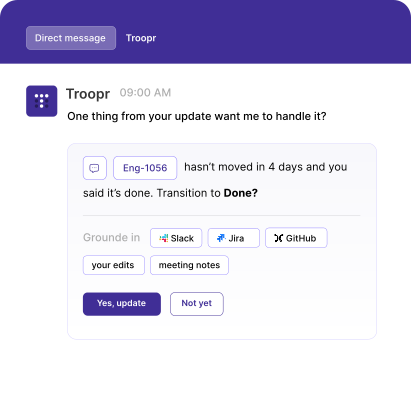
Human Approval: To ensure accuracy, every proposed change waits for a "yes." Troopr sends a direct message (DM) to the user with the suggested update.
Instant Sync: Once a user confirms the draft, Troopr automatically updates the corresponding Jira issue, status, or comment.
Key Benefits for the Team
By automating the update cycle, teams can maintain a high level of project hygiene with minimal effort. This workflow provides several immediate advantages:
Reduced Context Switching: Users can update Jira issues directly from Slack without opening a browser tab.
Accurate Data: Because updates are prompted by real activity, the risk of stale or forgotten tickets is significantly reduced.
Better Standups: Since the standup effectively "writes itself" from these updates, meetings become shorter and more focused on blockers rather than status reporting.
Getting Started
To begin using automatic updates, ensure that the Jira connection is verified and that Slack users are mapped to their Jira accounts. Once configured, Troopr will begin drafting updates for users to review in their next scheduled check-in.